

badge icon

This article was automatically translated from the original Turkish version.

Article

Kahoot!

kahoot.jpg
Kahoot!
Founding Year:
2013
Founders:
Morten VersvikJohan BrandJamie Brooker
Center:
OsloNorveç
Service Type:
Online education platform

Kahoot! is an online learning platform that enables the creation of fun and interactive quizzes (question-and-answer competitions). Founded in 2012 in Norway, the platform is used both in classroom and remote learning environments and is preferred by teachers, students, and professionals for various educational and event purposes.

Founding and Development

Kahoot! was initially developed in 2012 in Norway by Johan Brand, Jamie Brooker, and Morten Versvik. The project, carried out in collaboration with the Norwegian Science and Technology University (NTNU) and the business sector, was based on a project called “Lecture Quiz” research. Launched at the SXSW EDU Conference in 2013, Kahoot! began to be used globally within short time.

By 2020, it had achieved over one billion participations in more than 200 countries and reached millions of users. During the shift to remote education, Pandemic the platform’s usage rate increased significantly together.
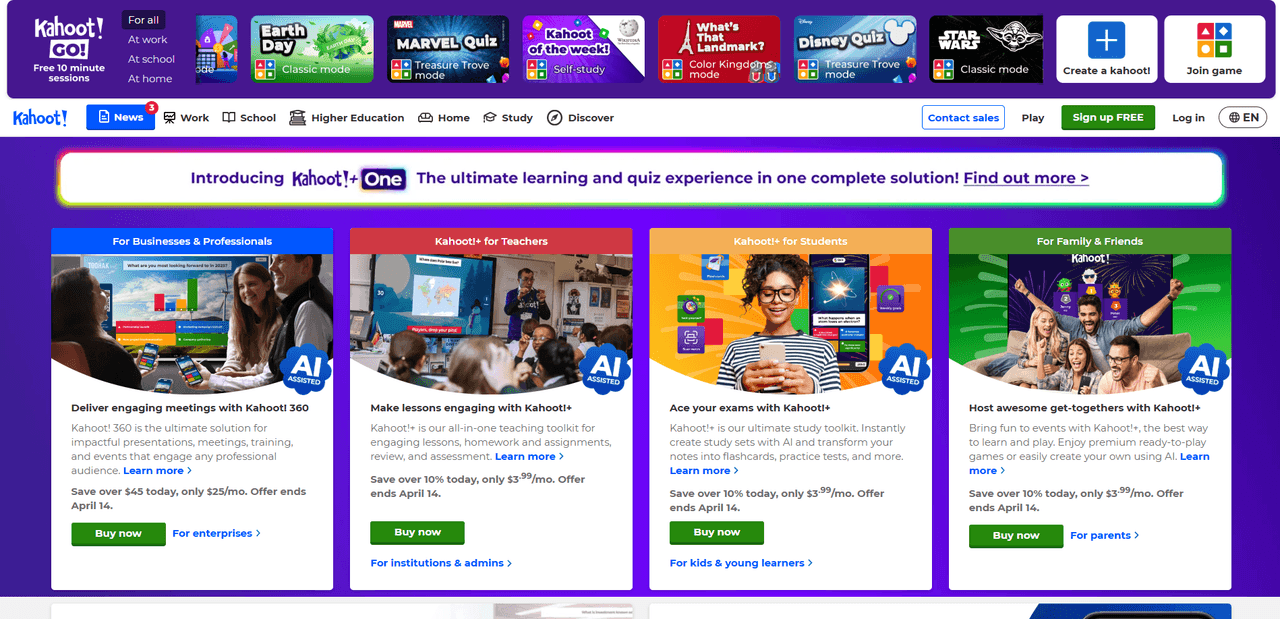

Kahoot! (homepage)

Features and Use Cases

Kahoot! is a gamification platform primarily used for educational purposes. Users can create their own quizzes or play existing ones. Its main features include:
  • Live Quiz Games: Simultaneous competitions initiated by teachers or administrators.
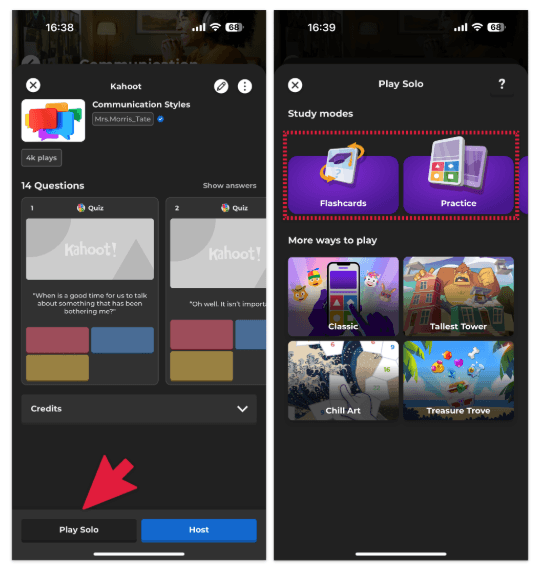
  • Individual Study Mode: Single-player modes allowing participants to progress at their own pace.
  • Reporting and Assessment: Performance can be evaluated based on answers, and class performance can be analyzed.
  • Ready-made Content: Millions of user-created quizzes are available for use.
  • Language Support: Available in many languages including Turkish.

Playing Modes

Mode selection (kahoot)

Kahoot! offers various work modes to meet different needs:

  • Classic Mode: Each player competes individually using their own device.
  • Team Mode: Multiple participants join from a single device and compete as a team.
  • Homework Mode: Students complete quizzes individually within a set time frame.
  • Challenge: Non-live, time-spaced competitions. Participants can join at any time.
  • Study Modes:
    • Flashcards: Facilitates memorization.
    • Practice: Allows repeated attempts until the correct answer is achieved.
    • Test: Quiz-style exam format for study.
    • Group Challenge: Competitive learning in small groups.

Kahoot! Versions and Licenses

Kahoot! offers various versions for both individual and institutional users:

  • Kahoot! Free: Includes basic quiz creation and playing features.
  • Kahoot! Plus / Pro / Premium: Offers advanced reporting, brand customization, and higher participant limits for educational institutions or businesses.
  • Kahoot! EDU: An extended licensing model designed for schools and universities.

Use in Education

Kahoot! is frequently chosen in education to enhance student motivation and support learning processes. It is commonly used in the following areas:
  • Lesson review
  • Exam preparation
  • Increasing participation and interaction
  • Group work
  • Corporate training and seminars

How to Use

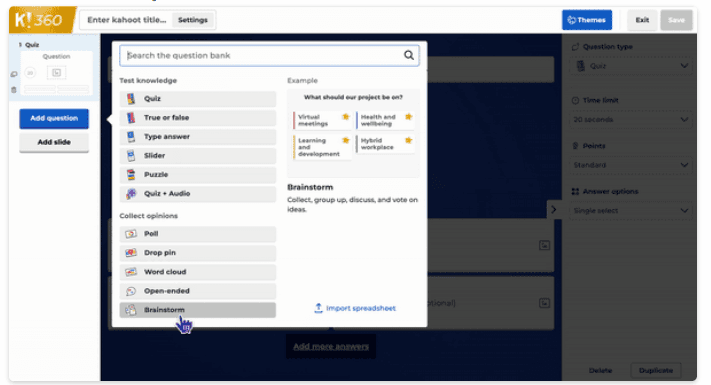
Creating a Kahoot! (home page)

1. Create a Kahoot! Account

  • Visit https://kahoot.com/.
  • Click the “Sign up” button.
  • Register by selecting an option such as teacher, student, personal, or business use.

2. Create a Quiz (Kahoot)

  • After logging in, click the “Create” button.
  • Add details such as title, description, and cover image.
  • Add your questions (multiple choice, true/false, puzzle, open-ended, etc.).
  • Set time limits and point values for each question.
  • You can also add images or videos.

3. Start the Game

  • To launch the prepared quiz in a classroom or online setting, click the “Start” option.
  • Players go to https://kahoot.it/ and enter the PIN code displayed on screen to join the game.
  • The host (teacher) manages the game while participants answer using their devices.

4. Reports and Results

  • At the end of the game, a scoreboard is displayed.
  • Participation data, correct/incorrect answers, and overall success rates can be downloaded or analyzed directly.

Security and Access

Kahoot! prioritizes user privacy and data security. To protect children, age restrictions are applied, and data policies are implemented in compliance with COPPA and GDPR such as regulations. Additionally, it provides a safe usage environment through content moderation and complaint systems.

Web and Mobile Compatibility

Kahoot! is accessible via both desktop and mobile devices. Mobile applications are available for Android and iOS. This allows users to create and play quizzes in any environment.

Author Information

Avatar
AuthorBüşranur AkpınarDecember 11, 2025 at 7:54 AM

Tags

Discussions

No Discussion Added Yet

Start discussion for "Kahoot!" article

View Discussions

Contents

  • Founding and Development

  • Features and Use Cases

  • Playing Modes

  • Kahoot! Versions and Licenses

  • Use in Education

  • How to Use

    • 1. Create a Kahoot! Account

    • 2. Create a Quiz (Kahoot)

    • 3. Start the Game

    • 4. Reports and Results

  • Security and Access

  • Web and Mobile Compatibility

Ask to Küre