

This article was automatically translated from the original Turkish version.
+2 More
Type(s) | Graphical representation | ||||||||
|---|---|---|---|---|---|---|---|---|---|
Definition(s) | Bar chart showing the distribution of numerical data | ||||||||
First Use | Karl Pearson (1891) | ||||||||
Purposes of Use | Risk analysis Quality control Resource planning Communication and reporting Decision support Distribution analysis | ||||||||
Commonly Used Tools | Asana (indirect) Microsoft Project R/Python Minitab Excel | ||||||||
Creation Stages | Creating the graph Calculating frequencies Defining class boundaries Determining number of classes and class width Data collection | ||||||||
Interpretation Criteria | Mean-median relationship Uncertainty structure Outliers Modality (number of modes) Symmetry/skewness | ||||||||
Histogram is a graphical representation of numerical data organized into groups.
A histogram typically displays data intervals (bins) on the X-axis and the frequency of data points within each interval as bars on the Y-axis. Karl Pearson developed a similar type of bar chart in 1891 to describe continuous data distributions and coined the term “histogram” for this new graphic. Pearson derived the term from the idea of presenting data distributions as a “historical diagram.” Over time, histograms became one of the fundamental tools in statistics and quality control. For example, in a quality process, control charts, Pareto diagrams, and histograms are used to analyze the distribution of a data set. Histograms visually reveal the central tendency, spread, and shape of the data such as skewness or multimodal distributions.
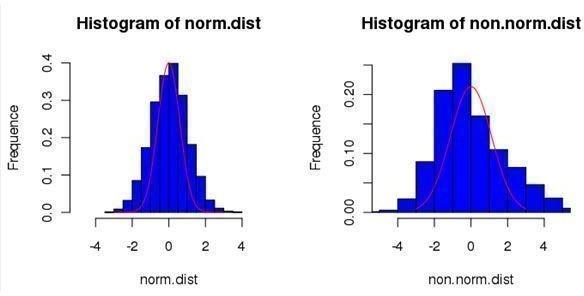
Histograms visualize the distribution of data. For instance, the example histogram above contains 100 randomly selected observations from a data set exhibiting a normal distribution. The height of each bar represents the number of values falling within each bin. Whether the histogram shape is symmetric or skewed provides clues about the proximity or distance between measures of central tendency such as the mean, median, and mode. Historically, the type of graph defined by Pearson emphasizes the continuity of numerical data.
In project management, histograms are used to summarize large data sets in an understandable manner. For example, in resource planning, daily or weekly resource requirements derived from man-hour estimates can be displayed using a histogram, making variations in resource demand apparent and providing a basis for schedule revisions. Resource histograms are among the most commonly generated charts in tools like Microsoft Project and enable visualization of fluctuations in resource demand. Additionally, histograms are used to visualize current performance or quality data collected during the project such as volume of completed work, delay durations, or number of defects. These charts support decision-making by providing the project team with an overview of the data. For instance, project management tools like Asana recommend visualizing data using bar charts; a histogram is a numerical adaptation of such bar charts. While bar charts display categorical distributions, histograms present numerical data divided into intervals. Thus, histograms help identify distribution characteristics of numerical project indicators such as duration times or cost distributions.
The primary purposes of histograms in project management are:
In quality management, histograms are used to visualize the frequency of errors or defects. According to PMI sources, histograms are among the frequently used tools in quality control processes alongside trend charts and control charts. For instance, in a production project, the frequency of different types of defects can be presented in histogram form, with defect categories on the horizontal axis and the number of defects per category on the vertical axis. The resulting histogram clearly identifies the most frequently occurring problems, enabling stakeholders to prioritize areas for improvement. The tallest bars in the histogram indicate the problem sources requiring the most attention.
In risk analysis, distributions obtained from techniques such as Monte Carlo simulation are graphically represented using histograms. For example, when numerous random trials are conducted to estimate a project’s completion time or cost, the results are aggregated into a histogram. This histogram shows the approximate probability distribution of possible outcomes. The mean of the distribution provides the expected value (EMV), while the shape of the histogram reveals the asymmetry and degree of uncertainty. PMI sources note that the shape of simulation output histograms tends to approximate the original probability distribution. Thus, histograms contribute to quantifying risk by serving as a fundamental tool in the uncertainty performance area.
The relationship of histograms with the performance areas in the PMBOK Guide Seventh Edition can be summarized as follows:
The process of creating a histogram generally follows these steps:
During this process, care must be taken in selecting the number and width of bins according to the type of numerical data. Excessively wide bins may obscure distribution details, while excessively narrow bins may produce overly fluctuating graphs. It is essential to define meaningful bins and ensure a sufficient sample size for analysis.
Histograms can be created using various general-purpose and specialized software:
These tools offer varying levels of flexibility and visualization options according to user needs. For example, Minitab provides options for automatic bin selection and customization of histogram appearance.
Histograms guide the process of extracting and analyzing distribution characteristics of a data set. The height of each bar indicates the number of observations within that bin interval, thereby visually revealing measures of central tendency and spread. For instance, in the above histogram (showing U.S. state areas), tall bars clustered in a specific range indicate concentrations, while skewness or multimodality reveals underlying patterns. Differences between bars or the number of peaks indicate heterogeneity within the underlying process or data set. During interpretation, decision areas are identified by examining which values fall within the highest-frequency bin. In quality management, the peaks in a histogram indicate the most frequently occurring defects and direct preventive or corrective actions to those areas. In risk analysis, the mean of the histogram represents the expected value (EV), while its shape reflects the level of uncertainty, allowing simulation outputs to estimate the probabilities of possible outcomes.
Several details must be considered when interpreting histograms. For example, structures such as skewness or bimodality reveal complex underlying data distributions and may require further investigation. Additionally, data gaps (due to data collection errors) or outliers may appear as isolated tall bars and must be evaluated. Accurate interpretation requires consideration of the data context, assumptions made during histogram creation, and potential data errors.
Effective use of histograms requires awareness of certain limitations. If inappropriate bin widths are selected (too wide or too narrow), the histogram may be misleading or inaccurate; the starting point of bins also affects the result. As one research finding notes, “the choice of bin number and starting point can significantly influence the visualization and may conceal data characteristics.” Furthermore, histograms only display the frequency distribution of a single variable; they do not reflect relationships between variables or temporal dynamics. For example, while process control charts track changes over time, histograms lack a time axis. Histograms do not present the exact values of data points; they only show the general distribution of frequencies. Therefore, when interpreting histograms, the size of the data set, measurement range, and conditions of data collection must also be taken into account.
In resource usage, it is important to avoid overinterpreting histograms. For example, histograms may not yield reliable results with small data sets. Additionally, too many bins or too few data points can distort the pattern observed in the histogram. When these limitations are considered, histograms should be used in conjunction with other analytical tools such as control charts, distribution plots, and graphical summaries, and interpretations must always be grounded in the detailed characteristics of the available data.
Asana. "Project Charts: How to Use Project Charts to Plan and Track Work." Asana Resources. Accessed June 28, 2025. https://asana.com/resources/project-charts.
Pearson, Karl. “On the Criterion That a Given System of Deviations from the Probable in the Case of a Correlated System of Variables Is Such That It Can Be Reasonably Supposed to Have Arisen from Random Sampling.” Philosophical Magazine Series 5, Vol. 50, No. 302 (1900): 157–175.
Project Management Institute. A Guide to the Project Management Body of Knowledge (PMBOK® Guide). Seventh Edition. Newtown Square, PA: Project Management Institute, 2021.
Project Management Institute. “Evaluate Your Decision with Monte Carlo Simulation.” Project Management Institute. Accessed June 28, 2025. https://www.pmi.org/learning/library/evaluate-decision-monte-carlo-simulation-4899.
Project Management Institute. “Quality Management—Processes, Tools, and Techniques.” Project Management Institute. Accessed June 28, 2025. https://www.pmi.org/learning/library/quality-management-9107.

Type(s) | Graphical representation | ||||||||
|---|---|---|---|---|---|---|---|---|---|
Definition(s) | Bar chart showing the distribution of numerical data | ||||||||
First Use | Karl Pearson (1891) | ||||||||
Purposes of Use | Risk analysis Quality control Resource planning Communication and reporting Decision support Distribution analysis | ||||||||
Commonly Used Tools | Asana (indirect) Microsoft Project R/Python Minitab Excel | ||||||||
Creation Stages | Creating the graph Calculating frequencies Defining class boundaries Determining number of classes and class width Data collection | ||||||||
Interpretation Criteria | Mean-median relationship Uncertainty structure Outliers Modality (number of modes) Symmetry/skewness | ||||||||
Purpose of Histograms in Project Management
Use of Histograms in Quality Management and Risk Analysis
Relationship with PMBOK 7 Performance Areas
Creation Process
Tools and Software Used
Interpretation of Histograms and Decision-Making
Considerations to Keep in Mind