


This article was automatically translated from the original Turkish version.
The accurate and aesthetic presentation of mathematical expressions holds great importance, especially in educational and scientific content. Traditionally, LaTeX has been preferred for such content, but its use in web-based applications can be challenging. At this point, KaTeX (Khan Academy TeX) stands out due to its fast, lightweight, and browser-friendly structure.
KaTeX is an open-source JavaScript library developed by Khan Academy. Its primary purpose is to display mathematical expressions quickly and accurately in web-based applications. Although it is based on LaTeX syntax, it distinguishes itself through superior browser compatibility and high performance. This library can be used directly on web pages and is widely preferred in educational platforms and scientific publishing.
KaTeX has two main components for processing mathematical expressions: a Parser and a Renderer. The Parser takes LaTeX syntax and converts it into an Abstract Syntax Tree (AST). The Renderer then uses this tree to generate HTML and CSS output. During this process, specially optimized mathematical fonts are used, ensuring that text and symbols are displayed with correct alignment and scaling.
KaTeX operates directly within the browser rather than on the server side. This significantly improves performance, especially on web pages with heavy mathematical content. Additionally, because it does not require server-side processing, it avoids potential security vulnerabilities.
The most prominent advantage of KaTeX is that it provides a fast and lightweight solution. While LaTeX requires substantial computational power even for large documents due to its complex structure, KaTeX eliminates this issue by running directly in the browser. Furthermore, its mobile-compatible design allows seamless use across various devices.
Another important feature of KaTeX is its broad format support. It successfully handles a wide range of mathematical expressions, including mathematical symbols, matrices, integrals, and derivatives. It is an effective tool for preparing educational materials or accurately displaying formulas in scientific articles.
On platforms such as Küre Encyclopedia, KaTeX formulas are typically written as follows:
Short formulas intended to appear within a sentence are written directly within the text and usually contain only basic symbols and superscripts/subscripts.
Appearance:
If you wish to write a large formula and have it appear centered on its own line, this is called a “block formula.” For example, a long equation involving integrals or a matrix structure requires this type of display.
Appearance:
In KaTeX, lowercase Greek letters are written as follows:
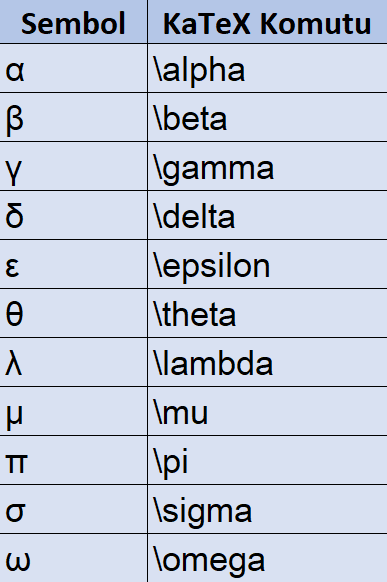
Example:
Appearance:
Uppercase letters are written in the same way, but the first letter must be capitalized:
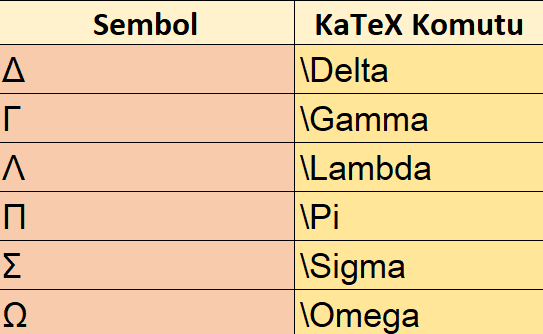
Example of summation:
Appearance:
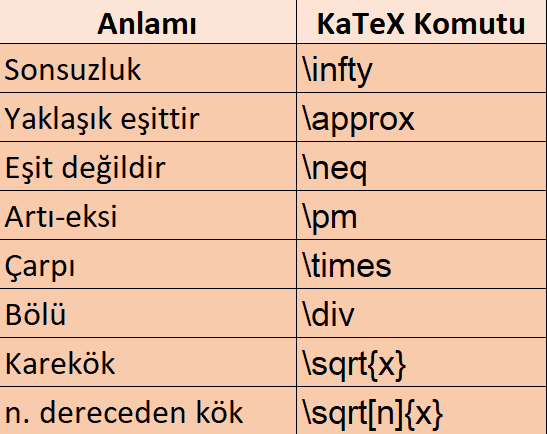
Summation Formula:
The capital Greek letter sigma is used for summation. When writing, the summation symbol is followed by the lower limit (i equals 1) and the upper limit (n). For example: “the sum of i squared from i equals 1 to n.”
Appearance:
Integral Formula:
The integral is represented by a symbol resembling a long s. The lower limit is placed below and the upper limit above. For example: “the integral of f(x) from a to b.”
Appearance:
Exponential Formula:
If you wish to raise a letter to another expression—for example, e raised to the power of π times i—it is expressed as: “e to the power of i pi.”
Appearance:
Limit Formula:
For limit expressions, first write “lim,” followed by the condition below, such as “as x approaches 0,” then the function.
Appearance:
Square Root Formula:
To denote a square root, write “sqrt.” For example: “the square root of a squared plus b squared” represents the Pythagorean theorem.
Appearance:
Matrix Expression Formula:
To write a matrix, begin with the matrix environment. Separate elements within each row with “&” and indicate a new row with “\\.” For example, a 2x2 matrix is expressed as:
First row: a and b, new row: c and d.
This matrix is enclosed in square brackets.
Appearance:
Appearance:

+ Adding Comments: KaTeX does not support comment lines; everything written will be rendered.
+ Using Turkish Characters: Turkish characters such as ç, ğ, ü cannot be used directly in KaTeX; they must be written as plain text outside the formula.
Example Formula – Multi-line Equation
Appearance:
a) Vector and Matrix Representations
Appearance:
b) Chemical Formulas
KaTeX does not directly support chemical notation, but it can be written as:
Appearance:
c) Piecewise Functions
Appearance:

Ready-to-Use Examples
Example 1
Appearance:
Example 2
Appearance:
Example 3
Appearance:
KaTeX. "Supported Functions." *KaTeX*. Accessed May 28, 2025. https://katex.org/docs/supported.html.
What is KaTeX?
Advantages
KaTeX Usage Rules:
A. Inline Formula Notation
B. Block (display) Formula Notation
Greek Letters and Special Symbols
Lowercase Greek Letters
Uppercase Greek Letters
Mathematical Symbols
Common Formula Templates in KaTeX
Symbols and Operators
Sets and Functions
Things to Note in KaTeX Writing
Advanced Topics for Technical Applications
Avoiding Errors
