


This article was automatically translated from the original Turkish version.
Remote Desktop Protocol (RDP) is a communication protocol developed by Microsoft that enables clients to access a remote computer via a graphical interface. Today it is widely used in many fields including information technology management virtual desktop infrastructures remote support and education. With features such as secure access resource redirection and cross-platform support RDP is one of the fundamental building blocks of modern digital work environments.
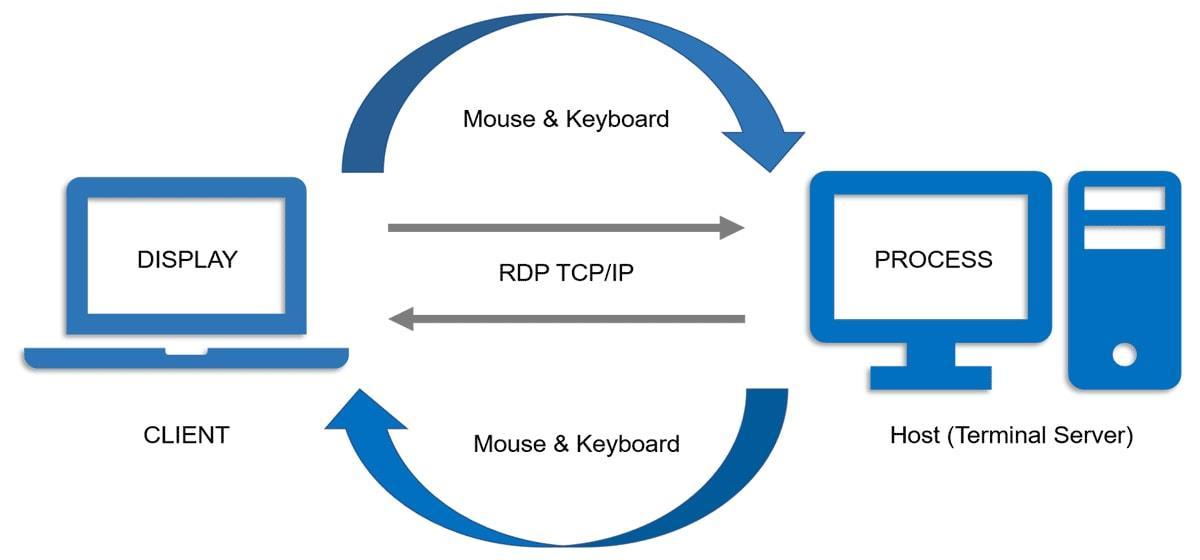
The diagram above illustrates the RDP communication model. On the left the client (CLIENT) is shown and on the right the server (HOST). Keyboard and mouse inputs from the client reach the server over TCP/IP. The desktop output generated by operations on the server is sent back to the client over TCP/IP. This interaction forms a continuous bidirectional cycle.
RDP verifies user identity before establishing a connection through Network Level Authentication (NLA). This process provides an effective means of ensuring security without placing load on the system.
RDP transmits compressed desktop images from the server to the client. This reduces bandwidth usage while enhancing the user experience. Starting with RDP 8.0 performance enhancements such as UDP support and RemoteFX graphical improvements have been introduced.
During an RDP connection resources on the client such as printers clipboard and drives are redirected to the server enabling the user to access local resources from the remote session.
File transfer between the client and server is possible via RDP. This is typically accomplished through shared folders.
Remote Desktop Protocol (RDP) is a fundamental protocol that provides secure fast and user-friendly remote access in modern IT infrastructures. With strong encryption authentication resource redirection and multi-platform support it offers an effective and flexible solution for remote access needs. However it must not be forgotten that improper configuration unsecured port management and lack of updated security measures can lead to serious security risks.
Cloudflare. "What Is the Remote Desktop Protocol (RDP)?" Accessed May 2025.
Coderspace. "Remote Desktop Protocol (RDP)." Accessed May 2025.
Microsoft Learn. "Understanding Remote Desktop Protocol." Accessed May 2025.
TechTarget. “Remote Desktop Protocol (RDP).” Accessed May 2025.
WiliVM. “How to Secure RDP.” WiliVM Blog. Accessed May 2025.

No Discussion Added Yet
Start discussion for "RDP (Remote Desktop Protocol)" article
Technical Architecture and Protocol Structure
Functional Features
1. Connection and Authentication
2. Graphical Transmission and Compression
3. Local Resource Redirection
4. File Transfer
Use Cases
Advantages and Challenges
Advantages
Challenges