


This article was automatically translated from the original Turkish version.
The Affinity Diagram is a visual organizing tool that groups a large number of seemingly independent ideas, observations, thoughts, or data points based on their natural relationships. This technique was first developed in the 1960s by Japanese anthropologist Jiro Kawakita, which is why it is also known in the literature as the KJ Method (Kawakita Jiro Method). Kawakita initially applied this method in sociological field studies to classify scattered qualitative data. Over time, Total Quality Management (TQM) practitioners recognized its adaptability to strategic planning and decision-making processes in business, leading to the Affinity Diagram being recognized as one of the seven new management tools of TQM. Introduced to the United States in the late 1980s by Michael Brassard, the Affinity Diagram has been widely adopted as an effective method for visually structuring large volumes of subjective information. In this regard, it differs from classical statistical tools by handling non-data-driven but content-rich ideas.
As noted by the American Society for Quality (ASQ), the Affinity Diagram is a fundamental quality tool used to bring together similar ideas, simplify complex problems, and establish conceptual coherence. It provides a systematic framework for teams to evaluate ideas collectively, identify common patterns, and form structured groups. The core strength of this method lies in its ability to reveal patterns among unstructured data. Today, the Affinity Diagram is widely used in numerous fields such as service design, user experience (UX), project management, strategic decision-making, process improvement, and academic analysis, particularly for organizing clusters of ideas generated after brainstorming sessions.
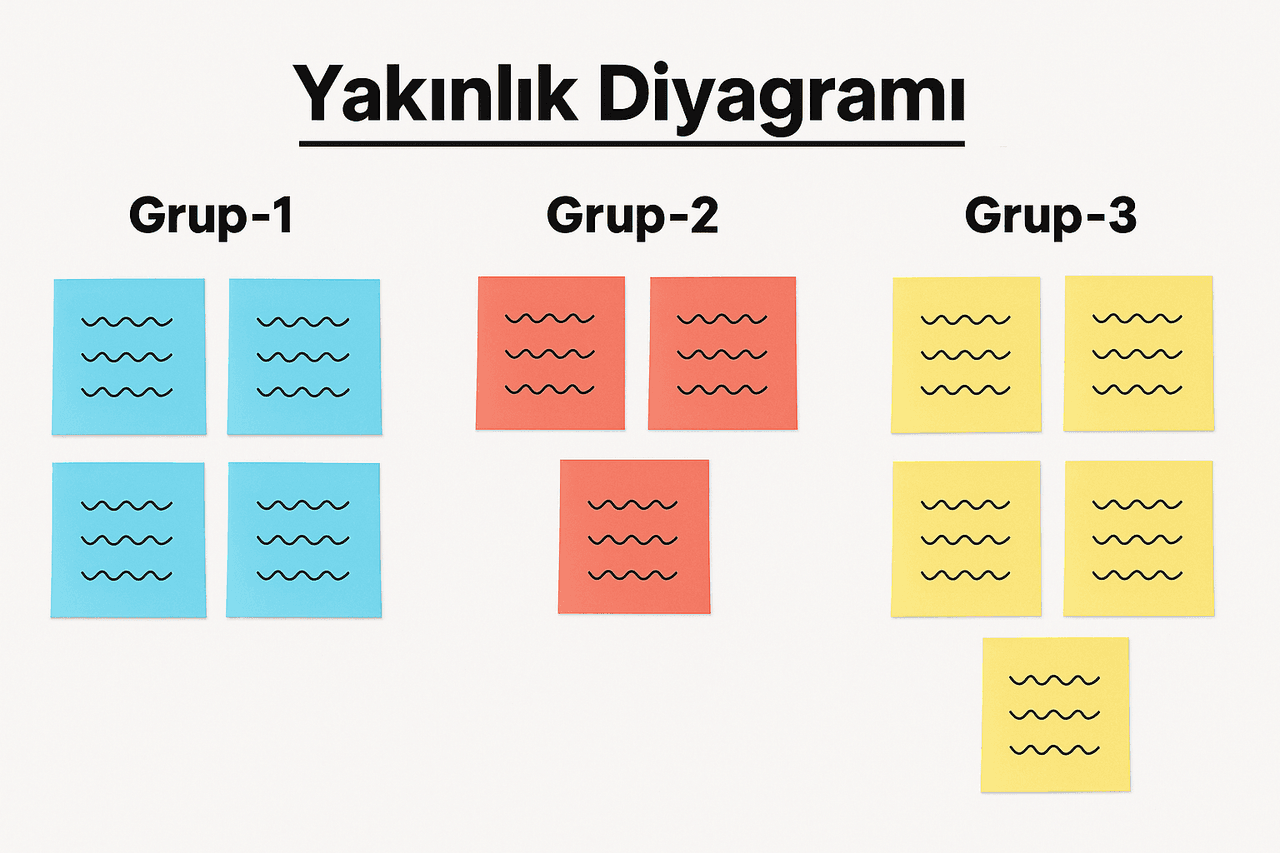
Illustration of an Affinity Diagram (generated by artificial intelligence.)
The primary purpose of the Affinity Diagram is to transform unstructured, scattered, and often verbal (qualitative) bodies of information into meaningful and organized groups, thereby introducing a systematic approach to problem-solving, decision-making, and idea development. Particularly in situations involving numerous participants with overlapping or ambiguous ideas—where it is unclear which ideas relate to which topics—the Affinity Diagram helps consolidate these ideas under common themes. This method supports the development of a more structured understanding by enabling the identification of patterns during individual or group-based creative thinking processes. The goal extends beyond mere data grouping; it also involves generating insights, identifying key problem areas, and strategically prioritizing ideas.
The context of use is broad. In management sciences, it is frequently applied in processes such as Total Quality Management (TQM), strategic planning, policy development, and project management. In education, it supports instructional planning and performance analysis. In marketing and product development, it aids in understanding user needs. In human-centered design approaches such as user experience and design thinking, Affinity Diagrams are used to organize data collected from user interviews, observations, and field research.
The Interaction Design Foundation notes that the Affinity Diagram also serves as a tool for integrating diverse perspectives of interdisciplinary team members under a common framework. It is particularly recommended in complex design processes requiring consensus-building and the grouping of numerous pieces of information. According to Asana, the project management software provider, the Affinity Diagram supports objectives such as clarifying goals at the start of a project, identifying root causes of problems, and improving collaboration by grouping ideas. In this way, it is a flexible tool that supports decision-making and planning processes at both individual and organizational levels.
In conclusion, the Affinity Diagram is an effective structuring and analysis tool for any professional discipline seeking to make sense of complex, disorganized, and multi-layered data. Its purpose is not limited to grouping ideas; it also plays a vital role in deriving strategic directions, identifying solutions, and establishing decision priorities from these groups.
The Affinity Diagram is a structured yet flexible method that systematically groups large numbers of ideas or data points to reveal natural patterns. The process spans from silent individual thinking stages to collaborative group decision-making. Implementation steps may vary between the classic approach and extended methods in certain contexts. The following steps describe the classic Affinity Diagram application process as recommended in the literature.
The process begins with clearly formulating the main topic or problem to be addressed. The problem statement must be clear, understandable, and designed to encourage creative thinking. Open-ended questions framed around “challenges,” “reasons,” or “how” are typically preferred. Excessive detail should be avoided, as it may restrict participants’ freedom of thought.
Participants generate ideas individually in response to the problem and write each idea concisely on separate sticky notes (e.g., 3x5 inches). Only one idea per note is allowed. This stage is conducted silently to encourage original ideas independent of group influence.
Participants present their notes one by one. Ideas are randomly posted on a board or wall. During this phase, duplicate ideas are removed, and ambiguous or unclear expressions are clarified. However, no criticism or evaluation is permitted. All ideas must be treated equally.
Participants silently examine the ideas and group them according to perceived natural relationships. No explanations or justifications are provided; ideas that feel similar are placed together. In this stage, physical proximity represents conceptual proximity. If an idea belongs to more than one group, it may be duplicated and placed in multiple locations as needed.
Each group of ideas is assigned a short, concise title that captures its overall meaning. Titles typically consist of three to five words and must be clear enough for an outsider to understand. This step is critical not only for classifying ideas but also for giving them meaning.
In some applications, grouped ideas are prioritized based on their impact or importance. In the classic method, this is done through participant voting. However, in the extended method proposed by Rafikul Islam (2005), multi-criteria decision-making techniques such as the Analytic Hierarchy Process (AHP) can be used to assign weighted priorities among ideas. This approach provides detailed analytical capacity, especially in strategic decision-making processes.
This process encourages both individual thinking and collective group decision-making, enabling not only classification of ideas but also the generation of insights, synthesis of information, and strategic direction-setting. Steps can be expanded or simplified depending on context. For example, in fast-feedback domains like UX work, some steps may be shortened; in environments requiring deep analysis such as strategic planning, all steps are fully implemented.
The Affinity Diagram can be applied in a wide variety of situations requiring the classification and interpretation of unstructured qualitative data. The tool is especially valuable in contexts characterized by uncertainty in decision-making, numerous and scattered ideas, high group participation, and a need for innovative solutions. Based on the provided sources, use cases can be summarized under the following headings:
The Affinity Diagram enables the systematic consideration of multiple stakeholder perspectives when defining strategic goals and long-term policies. It has been frequently used in Japan for strategic planning since the 1970s. Japanese managers adopted this concept specifically to achieve clarity in ambiguous or chaotic situations.
The Affinity Diagram is one of the “seven new management tools” developed within TQM. It is an effective tool for identifying the root causes of quality issues, developing solution alternatives, and structuring process improvement initiatives. Particularly when employees who are the source of the ideas participate, root causes can be more accurately identified.
The Nielsen Norman Group identifies the Affinity Diagram as a critical tool for analyzing qualitative data from user research. Data such as interview notes, field observations, and user quotes are grouped using this method, enabling the identification of user needs, problems, and opportunity areas. It facilitates user-centered conceptualization early in the design process.
The Affinity Diagram provides a systematic step after unstructured brainstorming sessions to thematically group generated ideas. By grouping ideas based on semantic rather than merely numerical proximity, teams can more easily determine which areas to focus on.
Affinity Diagrams are used to conceptually classify numerous evaluation criteria in multidimensional areas such as higher education performance. For example, in a systematic literature review containing 78 distinct performance indicators, these indicators were grouped into 15 categories using the Affinity Diagram. This approach enables holistic interpretation of fragmented literature findings.
According to sources such as Asana and Creately, the Affinity Diagram is also effective for classifying customer feedback from market research and forming clusters of needs and complaints. In product or service development processes, it organizes user feedback into thematic groups to inform redesign or innovation efforts.
When the goal is to build team consensus, integrate perspectives from multiple stakeholders, or bring diverse viewpoints under a unified structure, the Affinity Diagram is a powerful tool. It is particularly important for ensuring equitable participation and making each participant’s contribution visible.
In this context, the Affinity Diagram is not merely a method for categorizing ideas but also an analytical tool that simplifies information-intensive processes and creates conceptual coherence. As its application areas expand, it is increasingly recognized not only as a managerial tool but also as a widely preferred method in research and design-oriented disciplines.
The Affinity Diagram organizes scattered and subjective ideas into analyzable forms based on their natural relationships. In environments rich in qualitative data—such as user interviews or field observations—it provides conceptual clarity by grouping data into thematic categories.
The method creates a non-judgmental environment for idea generation, enhancing individual creativity. Silent brainstorming and silent grouping stages support active participation from introverted or less experienced participants.
When group titles are collaboratively determined by participants, they contribute to conceptual alignment within the group. In this way, the Affinity Diagram functions not only as a data processing tool but also as a medium for communication and mutual understanding within teams.
The method is not dependent on any specific technology or software. It can be easily applied in various settings such as Post-it notes, whiteboards, or digital platforms. This makes it suitable for both in-person and remote meetings.
It serves not only for grouping ideas but also for establishing cause-effect relationships, identifying problem areas, generating strategies, developing products, and analyzing user feedback.
Affinity Diagrams rely heavily on participants’ subjective judgments. Personal biases, differences in experience, or group pressure may lead to incorrect thematic groupings.
Implementing the method requires specific preparation, facilitation, and follow-up. When the number of participants is large, the processes of idea generation, grouping, and title creation can be time-consuming.
While Affinity Diagrams excel at categorizing ideas, they provide limited insight into why certain ideas are important or how they should be prioritized. Without extension by methods such as AHP, they may offer only superficial analysis.
The effectiveness of the method is directly tied to the facilitator’s experience. Poor facilitation may result in loss of meaning, omission of duplicates, or exclusion of important ideas.
Although silence is emphasized during idea sharing, status differences among group members or unequal expressive abilities can affect the quality of shared ideas, potentially compromising the completeness of the analyzed data.
American Scoiety for Quality. "What is an Affinity Diagram?" Accessed May 5, 2025. Accessed Adresi.
Asana. (2025). "Affinity diagram: How to organize information". Accessed May 5, 2025. Accessed Adresi.
Awasthi, A., & Chauhan, S. S. (2012). A hybrid approach integrating Affinity Diagram, AHP and fuzzy TOPSIS for sustainable city logistics planning. *Applied Mathematical Modelling*, *36*(2), 573-584. Accessed Adresi.
Creately. (2022). "Learn What is an Affinity Diagram and How to create an Affinity Diagram". Accessed May 5, 2025. Accessed Adresi.
Interaction Design Foundation. "Affinity Diagrams." Accessed May 5, 2025. Accessed Adresi.
Iqbal, S., Ashfaq, T., & Taib, C. A. B. (2022). A systematic literature review on organizational performance in global higher education: an affinity diagram approach. *Pakistan Journal of Social Research*, *4*(1), 688-701. Accessed Adresi.
Islam, R. (2005). Rioritization of ideas in an affinity diagram by the AHP: An example of k-economy. *International Journal of Economics, Management and Accounting*, *13*(1). Accessed Adresi.
Krause, R. & Pernice, K. (2024). "Affinity Diagramming for Collaboratively Sorting UX Findings and Design Ideas". Nielsen Norman Group. Accessed May 5, 2025. Accessed Adresi.

Purpose and Context of Use
Method and Implementation Steps
Problem Definition
Individual Brainstorming
Idea Presentation and Scrubbing
Silent Grouping
Group Title Creation (Header Cards)
Prioritization (Optional)
Use Cases
Strategic Planning and Policy Development
Total Quality Management (TQM) and Process Improvement
User Experience (UX) and Design Thinking
Post-Brainstorming Idea Grouping
Education and Academic Performance Analysis
Market Research and Customer Feedback Analysis
Team Cohesion, Communication, and Consensus Building
Advantages and Limitations
Advantages
Transforming Complex Information into Meaningful Structures
Encouraging Creativity and Participation
Fostering Idea Consensus and Team Cohesion
Structural Flexibility
Multifunctional Applicability
Limitations
Risk of Subjective Interpretation
Time and Resource Intensity
Limited Depth of Idea Analysis
Dependence on Facilitator Competence
Impact of Group Imbalances