

badge icon

This article was automatically translated from the original Turkish version.

Article

In the field of image processing and computer vision, establishing a balance between noise reduction and detail preservation has always been a challenging problem. In this context, the bilateral filter stands out as an effective method that simultaneously reduces noise while preserving edges and important details in images. First introduced by Tomasi and Manduchi in 1998, this filter differs from traditional filtering techniques by considering not only spatial proximity but also the similarity of pixel intensities.

Bilateral Filter

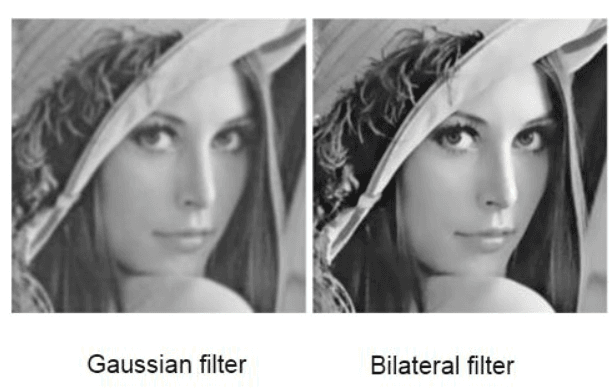
The bilateral filter is a nonlinear filtering technique used in image processing. Its primary objective is to reduce noise in an image while preserving its edges and fine details. Traditional filters such as Gaussian blur apply uniform weighting to all pixels in a neighborhood, resulting in the smoothing of edges along with noise. The bilateral filter addresses this issue by combining two distinct weighting functions:


  1. Spatial Proximity (Spatial Domain): Considers the physical distance between a pixel and its neighboring pixels.
  2. Intensity Similarity (Range Domain): Measures the similarity of a pixel’s grayscale or color value to those of its neighbors.


This dual approach enables the filter to consider not only pixels that are spatially close but also those with similar intensity values. For example, if two pixels on either side of an edge have significantly different intensities, the filter distinguishes between them and preserves the edge.

Historical Context

The bilateral filter was introduced by Carlo Tomasi and Roberto Manduchi in 1998 in their paper titled “Bilateral Filtering for Gray and Color Images.” This method was developed to overcome the limitations of then-popular linear filtering techniques such as Gaussian filtering. Subsequently, Sylvain Paris and other researchers further refined its theoretical and practical aspects during the 2000s.

Working Mechanism of the Bilateral Filter

To illustrate the logic of the bilateral filter with an example, consider the task of computing the filtered value of a specific pixel in a noisy grayscale image.


Step 1: Neighborhood Definition: A window around the pixel is selected (e.g., 5x5).

Step 2: Spatial Weight Calculation: For each pixel, the Gaussian weight Gσs is computed based on its distance from the center pixel.

Step 3: Intensity Weight Calculation: For each neighboring pixel, the Gaussian weight Gσr is computed based on the difference in intensity with the center pixel.

Step 4: Weight Multiplication: The spatial and intensity weights are multiplied to obtain a combined weight for each pixel.

Step 5: Weighted Average: The values of neighboring pixels are multiplied by their respective weights, summed, and normalized.


This process mechanism ensures edge preservation. For instance, if the intensity values of pixels near an edge differ significantly, the Gσr weight becomes very small, reducing the influence of those pixels.

Mathematical Foundations of the Bilateral Filter

To understand the working principle of the bilateral filter, its mathematical formulation must be examined. For each pixel in an image, the filtered value is computed using the following formula:
<span class="katex"><span class="katex-html" aria-hidden="true"><span class="base"><span class="strut" style="height:1em;vertical-align:-0.25em;"></span><span class="mord mathnormal" style="margin-right:0.07847em;">I</span><span class="mord mathnormal" style="margin-right:0.10764em;">f</span><span class="mord">​</span><span class="mopen">(</span><span class="mord mathnormal">p</span><span class="mclose">)</span><span class="mspace" style="margin-right:0.2778em;"></span><span class="mrel">=</span><span class="mspace" style="margin-right:0.2778em;"></span></span><span class="base"><span class="strut" style="height:1em;vertical-align:-0.25em;"></span><span class="mord mathnormal" style="margin-right:0.13889em;">W</span><span class="mord mathnormal">p</span><span class="mord">​1​</span><span class="mspace" style="margin-right:0.1667em;"></span><span class="mop op-symbol small-op" style="position:relative;top:0em;">∑</span><span class="mspace" style="margin-right:0.1667em;"></span><span class="mord mathnormal" style="margin-right:0.03588em;">q</span><span class="mspace" style="margin-right:0.2778em;"></span><span class="mrel">∈</span><span class="mspace" style="margin-right:0.2778em;"></span></span><span class="base"><span class="strut" style="height:1em;vertical-align:-0.25em;"></span><span class="mord mathnormal" style="margin-right:0.05764em;">S</span><span class="mord">​</span><span class="mord mathnormal">G</span><span class="mord mathnormal" style="margin-right:0.03588em;">σ</span><span class="mord mathnormal">s</span><span class="mord">​​</span><span class="mopen">(</span><span class="mord">∥</span><span class="mord mathnormal">p</span><span class="mspace" style="margin-right:0.2222em;"></span><span class="mbin">−</span><span class="mspace" style="margin-right:0.2222em;"></span></span><span class="base"><span class="strut" style="height:1em;vertical-align:-0.25em;"></span><span class="mord mathnormal" style="margin-right:0.03588em;">q</span><span class="mord">∥</span><span class="mclose">)</span><span class="mspace" style="margin-right:0.2222em;"></span><span class="mbin">⋅</span><span class="mspace" style="margin-right:0.2222em;"></span></span><span class="base"><span class="strut" style="height:1em;vertical-align:-0.25em;"></span><span class="mord mathnormal">G</span><span class="mord mathnormal" style="margin-right:0.03588em;">σ</span><span class="mord mathnormal" style="margin-right:0.02778em;">r</span><span class="mord">​​</span><span class="mopen">(</span><span class="mrel">∣</span><span class="mspace" style="margin-right:0.2778em;"></span></span><span class="base"><span class="strut" style="height:1em;vertical-align:-0.25em;"></span><span class="mord mathnormal" style="margin-right:0.07847em;">I</span><span class="mopen">(</span><span class="mord mathnormal">p</span><span class="mclose">)</span><span class="mspace" style="margin-right:0.2222em;"></span><span class="mbin">−</span><span class="mspace" style="margin-right:0.2222em;"></span></span><span class="base"><span class="strut" style="height:1em;vertical-align:-0.25em;"></span><span class="mord mathnormal" style="margin-right:0.07847em;">I</span><span class="mopen">(</span><span class="mord mathnormal" style="margin-right:0.03588em;">q</span><span class="mclose">)</span><span class="mspace" style="margin-right:0.2778em;"></span><span class="mrel">∣</span></span><span class="base"><span class="strut" style="height:1em;vertical-align:-0.25em;"></span><span class="mclose">)</span><span class="mspace" style="margin-right:0.2222em;"></span><span class="mbin">⋅</span><span class="mspace" style="margin-right:0.2222em;"></span></span><span class="base"><span class="strut" style="height:1em;vertical-align:-0.25em;"></span><span class="mord mathnormal" style="margin-right:0.07847em;">I</span><span class="mopen">(</span><span class="mord mathnormal" style="margin-right:0.03588em;">q</span><span class="mclose">)</span></span></span></span>

Advantages and Disadvantages of the Bilateral Filter

Advantages

  • Edge Preservation: Unlike traditional Gaussian blur, it does not blur edges.
  • Noise Reduction: Effectively removes low to medium levels of noise.
  • Flexibility: Easily adjustable via parameters σs and σr.

Comparison of Gaussian Filter and Bilateral Filter (Credit: AI Learning Centre)

Disadvantages

  • Computational Cost: Due to its nonlinear nature, it is computationally intensive.
  • Parameter Sensitivity: Incorrect σ values may lead to insufficient noise reduction or excessive smoothing.
  • Halo Effect: Very large σr values can cause unwanted brightness or darkness artifacts (halos) around edges.

Applications

The bilateral filter is used in numerous applications:

  • Photographic Editing: Enhances image quality by reducing noise without blurring details.
  • Medical Imaging: Cleans noise in MRI or CT scans while preserving anatomical details.
  • Computer Vision: Used as a preprocessing step prior to object detection.

Implementation Code for the Bilateral Filter

To translate the theoretical foundations of the bilateral filter into executable code, the following steps are required: scanning the image pixel by pixel, defining a window around each pixel, computing spatial and intensity weights, calculating the weighted average, and applying normalization.


Author Information

Avatar
AuthorBeyza Nur TürküDecember 20, 2025 at 7:11 AM

Tags

Discussions

No Discussion Added Yet

Start discussion for "Bilateral Filter" article

View Discussions

Contents

  • Bilateral Filter

    • Historical Context

  • Working Mechanism of the Bilateral Filter

  • Mathematical Foundations of the Bilateral Filter

  • Advantages and Disadvantages of the Bilateral Filter

    • Advantages

    • Disadvantages

  • Applications

  • Implementation Code for the Bilateral Filter

Ask to Küre