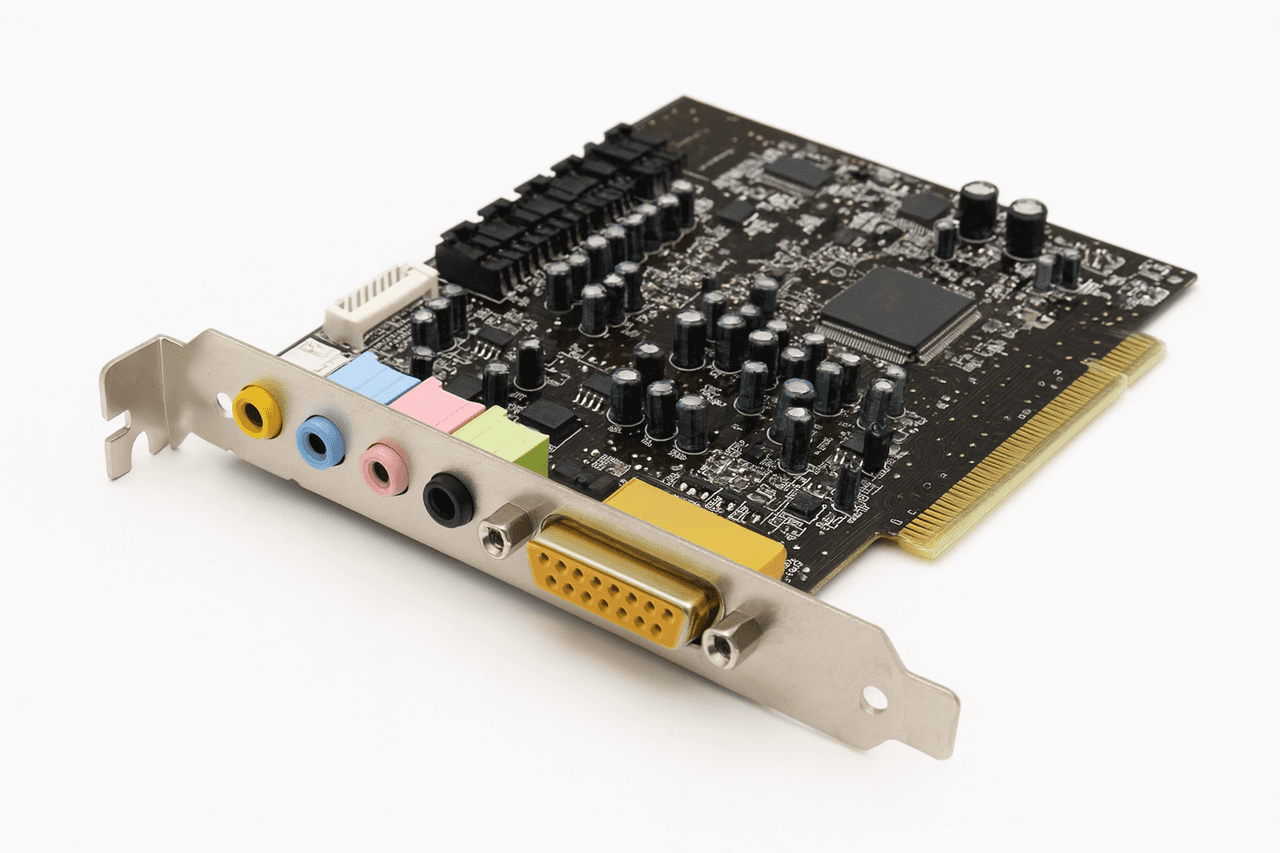
A sound card is a hardware component in computer systems that converts digital audio data into analog audio signals and converts analog audio signals into digital data.
Since computers can only process digital data, they cannot directly handle analog signals produced by microphones, speakers, or other audio devices. Therefore, the sound card serves as an intermediary unit that enables audio signals to enter and exit the computer.
Image Related to the Sound Card (Generated by Artificial Intelligence)
Sound cards enable the recording, processing, storage, and playback of audio through speakers or headphones. In modern computer systems, the sound card is typically integrated directly onto the motherboard (onboard), but external sound cards are also used for higher audio quality or multichannel audio requirements.
The primary purpose of a sound card is to enable communication between the computer and peripheral audio hardware. It performs functions such as playing music files, recording audio via microphone, transmitting audio during video conferences, and generating sound effects in films or games.
The card’s function is bidirectional:
- Audio Input: Converts analog signals from microphones, musical instruments, or other audio sources into digital format.
- Audio Output: Transforms digital audio data into analog signals audible through speakers or headphones.
During these processes, the sound card performs the steps of sampling, quantization, and encoding. The sampling rate (e.g., 44.1 kHz, 48 kHz, or 96 kHz) and bit depth (16 bit, 24 bit, 32 bit) are the key parameters that determine audio quality.
A sound card contains specialized circuits and connection elements for processing and transmitting digital audio signals. Its main components are summarized below:
- Digital Signal Processor (DSP): Acts as the “brain” of the sound card. It processes digital audio data, applies audio effects, and manages audio channels. The processing power of the DSP determines the number of simultaneous audio channels that can be produced (e.g., 32, 64, or 128 channels).
- Digital-to-Analog Converter (DAC): Converts digital audio data generated by the computer into analog signals suitable for speakers or headphones. Sampling and filtering circuits are used during this conversion process.
- Analog-to-Digital Converter (ADC): Converts analog audio signals from microphones or external audio sources into digital data, making the audio processable in the digital environment.
- ROM Memory: Sound card manufacturers often include ROM memory on some cards to store sample audio data (e.g., MIDI sounds) or basic device software (firmware).
- Connection Ports:
- Line In: Accepts analog signals from external devices.
- Microphone In: Designed for microphone connection.
- Line Out / Speaker Out: Provides audio output to speakers or headphones.
- Rear / Subwoofer Out: Connects rear channels in 5.1 or 7.1 audio systems.
- S/PDIF (Sony/Philips Digital Interface): Provides digital audio output and is used for lossless audio transmission.
6.Visual Indicators: Most modern sound cards include power, connection, and signal indicators. These LED indicators assist in monitoring signal flow and connection status.
Image Explaining the Internal Block Structure and Operation of the Sound Card (eba)
A sound card carries out the process of audio input from the computer to output through speakers in a series of stages:
- Conversion of Analog Audio to Digital Format: Sound waves generated by a microphone or musical instrument exist as analog signals. These signals are converted into digital data by the ADC on the sound card at a specified sampling rate.
- Digital Processing Stage: The converted data is processed by the DSP. Operations such as noise reduction, reverb, equalization, and multichannel audio mixing occur at this stage.
- Playback: The processed digital audio data is converted back into analog signals via the DAC and sent to speakers or headphones.
During this process, the sound card uses a clock circuit to ensure that data is processed at the correct sampling rate. Additionally, error checking is performed during data transmission to prevent signal distortion.
Sound cards are classified according to both data bus standards and physical structure:
- ISA (Industry Standard Architecture): An older connection standard used primarily in the late 1980s.
- PCI (Peripheral Component Interconnect): Became widespread from the 1990s onward.
- PCI-Express (PCIe): The most commonly used data bus standard today; provides high bandwidth and low latency.
- USB Sound Card: External, portable sound cards connected to the computer via USB.
- Onboard Sound Card: Integrated audio processors found on modern motherboards. Sufficient for everyday use and basic multimedia applications.
- External (Expansion or USB) Sound Card: Preferred in professional audio editing, recording studios, and music production. Offers higher audio resolution, lower noise levels, and multiple input/output channels.
The performance, audio quality, and usability of sound cards are determined by the following technical criteria:
- Sampling Rate: Indicates the number of audio samples taken per second. The standard rate for CD-quality audio is 44.1 kHz. Professional systems use 96 kHz or 192 kHz.
- Bit Depth: Determines the resolution of each audio sample. A 16-bit system can represent 65,536 different audio levels, while a 24-bit system can represent 16.7 million levels.
- Signal-to-Noise Ratio (SNR): Measures the difference between the signal strength and background noise. A high SNR value (e.g., above 100 dB) indicates cleaner audio.
- Frequency Response: Defines the range of frequencies the sound card can process. The standard range suitable for human hearing is typically 20 Hz to 20 kHz.
Sound cards are used across a wide range of personal and professional applications.
- Personal Computers: Music listening, video viewing, game audio.
- Recording Studios: Professional audio recording and mixing.
- Educational and Multimedia Environments: Audio narration, presentations, and distance learning systems.
- Security Systems: Audio-based recording or analysis applications.
- Telecommunications and Broadcasting: Audio transmission, internet-based streaming, conferencing systems.
- Performs analog-to-digital and digital-to-analog conversion with high accuracy.
- Supports multichannel audio (stereo, 5.1, 7.1).
- Compatible with audio editing software.
- Advanced models include digital audio outputs (S/PDIF, Optical).
- Offers low latency for professional recording.
- Onboard sound cards do not provide professional-grade recording quality.
- Can be affected by electromagnetic interference.
- Low-quality converters (DAC/ADC) may cause audio distortion.
- Hardware driver incompatibilities can result in audio latency.
The sound card is a fundamental hardware component that enables computers to process digital audio. Acting as a bridge between the analog and digital worlds, it plays a vital role in both recording and playback of sound. Although integrated sound cards are common in modern computer systems, external sound cards are preferred in professional music production and recording fields.